Industrial Automation & Control Systems
Design, configuration and delivery of robust, safe and maintainable control systems.
 →

Engineering | Health & safety | Hazardous areas
Health and safety software, ATEX and hazardous area inspection tools and engineering services for UK industrial sites, in one connected platform.
XF Solutions combines industrial engineering services with the XF App Suite, helping teams improve automation, safety, compliance and operational control.
Already use the suite? Sign in

Engineering services
Practical, engineering-led services from concept to operational support, backed by digital tools that keep your asset information connected and current.
All engineering servicesDesign, configuration and delivery of robust, safe and maintainable control systems.
→Plan and deliver low-risk migrations from legacy systems to modern, supported platforms.
 →
Independent review, verification and problem solving to reduce operational risk.
 →
FAT / SAT, site verification and I/O validation to ensure a safe, controlled start-up.
 →
Additional service areas include hazardous area engineering, electrical & controls installation, process & functional safety support, digital engineering records, data onboarding, and platform configuration. Engagements are defined by project scope, and regulated or certifying activities require separate confirmation.
01 · The operational challenge
Registers in spreadsheets, inspection reports on paper, permits in a binder and actions in someone’s inbox. Each record makes sense on its own, but the relationships between them are where risk hides.
 XF App Suite
One connected record
The XF App Suite holds these activities as linked records in one platform. An asset knows its inspections; a defect becomes an action; a work order can close that action; a barrier takes its state from the evidence behind it. Related work can be seen together, from the field and from the office.
02 · Introducing the XF App Suite
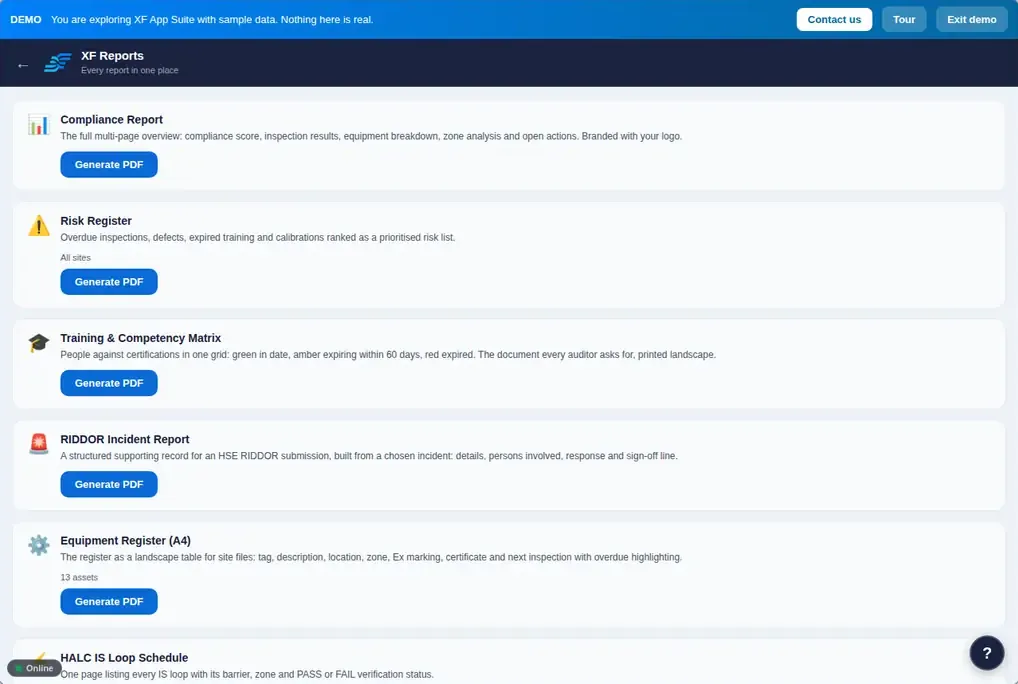
Genuine screens from the XF App Suite demonstration organisation. Every name, site and record shown is invented sample data.
03 · Explore the applications
Choose an area to see its applications, then choose an application for its purpose, main features and the standards it references. Applications are licensed individually: your organisation sees only the apps it has.
Ex equipment, inspections, repairs, terminations, IS loops, zones, earthing and electrical certification. More on hazardous areas
Permits, isolations and managed change, from raising to close-out. More on control of work
Bow-ties, HAZOP, LOPA, safety functions and a site-level view of risk.
Incidents, observations, RAMS, COSHH, audits, checklists, actions and briefings. More on health
Who is on site, who is competent, and who is working alone. More on people
Statutory examinations, planned maintenance, work orders, calibration, detection, fire and documents.
Environmental records, energy and carbon, and the law that applies to each site.
Analytics, reports, compliance scores, due dates, workflows, your own apps and administration.
Standards listed are those each application is designed to help you work to, as set out in the XF App Suite User Guide. They are not statements of certification, and using the suite does not by itself make an organisation compliant.
04 · Connected workflows
One example of how a record moves through the suite. Select a step to see its role.
Illustrative workflow based on documented functionality. Defects are offered as actions for the inspector to confirm; nothing is raised silently, and what happens at each step depends on your configuration, licences and the people doing the work.
05 · Built for real working environments
The suite runs in a modern browser on a PC, tablet or phone, and keeps working when the signal drops.
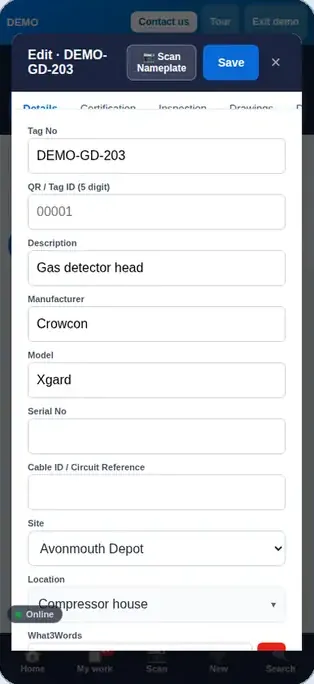
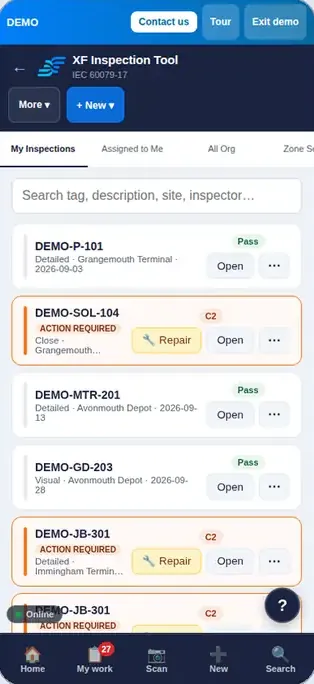
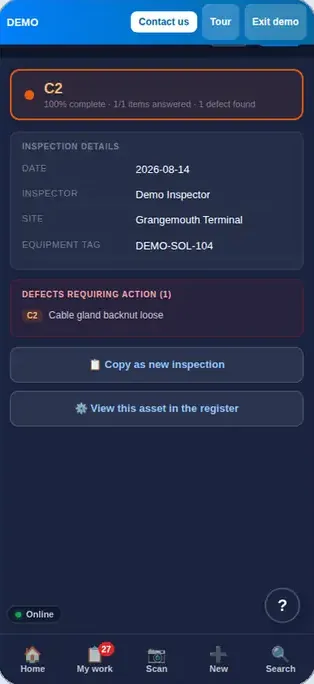
Phone screens from the demo organisation. Sample data.
06 · Process safety & engineering intelligence
Barrier Health draws bow-ties whose barriers take their state from the records behind them. Select a barrier in this example to follow its evidence.
Swipe sideways to see the whole bow-tie →
The suite is decision support. Calculations, classifications and barrier states help competent people see and prioritise; they do not replace professional judgement, verification or sign-off by suitably competent engineers.
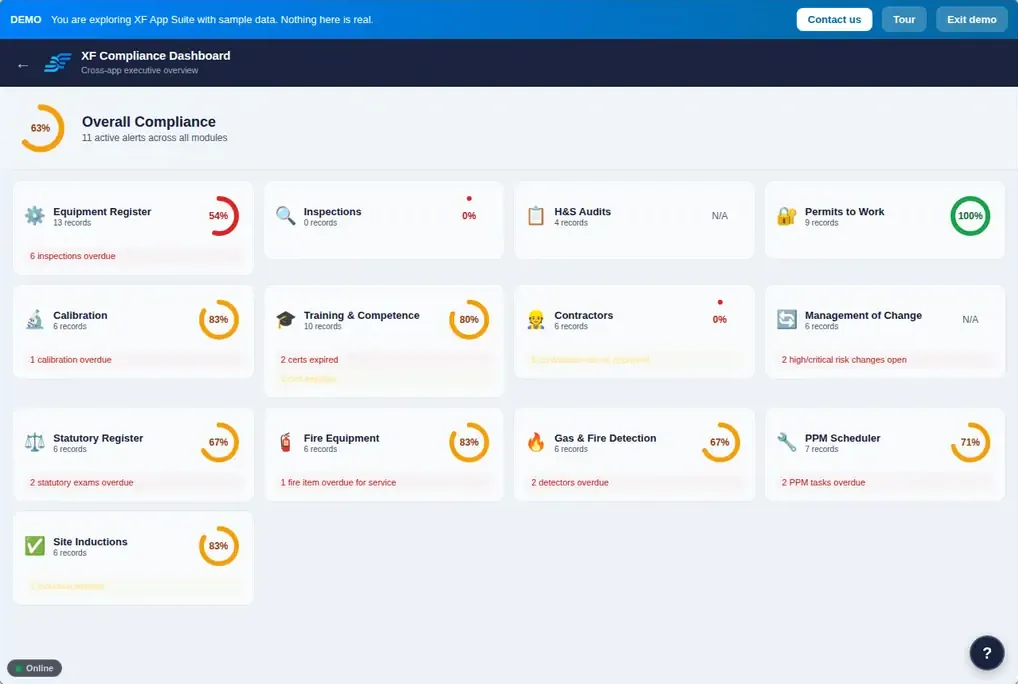
07 · Analytics & management visibility
Analytics shows tabs only for the apps you have, alongside ready-made reports, a compliance score per app and a calendar of everything due. Try this example dashboard.
08 · Getting started
Understand the application areas and the operational challenges they address.
Browse applicationsOpen the demonstration, which loads example records and offers guided tours. Nothing you do there is saved.
Open the demoTalk to XF Solutions about the modules you need, your operational context and how you want to implement.
Contact usSign in with the account your organisation provides, including company single sign-on where it is set up.
Sign in09 · Interactive demonstration
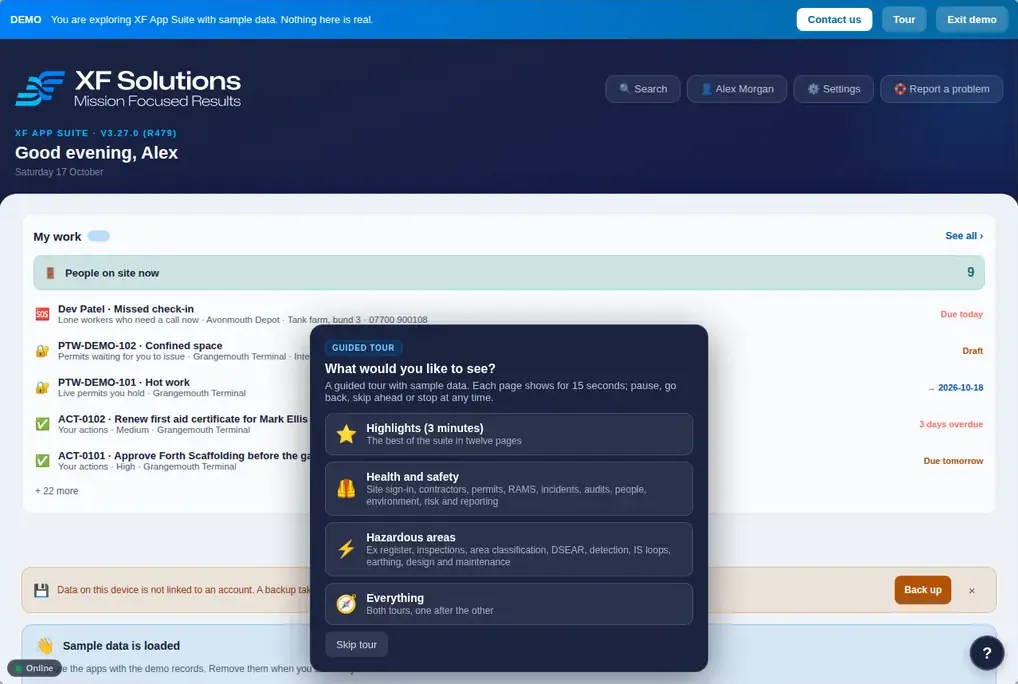
Choose See It in Action on the sign-in page. The demo loads sample records, nothing you do there is saved, and a guided tour offers four routes through the suite.
Opens app.xfsolutions.tech. Choose See It in Action; no account is needed, and this website never asks for your sign-in details.
10 · Documentation & technical resources
The full XF App Suite User Guide lives inside the suite and is updated with each release: Settings › Help & support › User Guide, or Read more in the user guide from the ? help on any page.
Every app, step by step, with desktop and phone screenshots from the demo organisation. Includes Applications at a glance and the release history.
Download the user guide (PDF, 8.3 MB)
Or open it in your browser, or use the in-app guide under Settings › Help & support.
Sign in, tour the demo, install on your device and find your way around Home, My work and Search.
Getting startedWhat each application does and the standards it is designed to help you work to.
Explore applicationsHow inspections, actions, maintenance and reporting connect.
See the workflowIEC 60079 series, BS 7671, IEC 61511, RIDDOR, COSHH, DSEAR, ISO 45001 and more, listed per application.
By applicationWhat’s new is under Settings › Help & support in the suite, and Appendix B of the guide lists every release.
Use Report a problem in the suite for a referenced support ticket, or email info@xfsolutions.tech.
11 · Who the platform is for
Select a role to see representative tasks and the capabilities that support them.
13 · Platform evidence
The summary below reflects the current XF App Suite content and the XF Solutions service offering. Approved customer testimonials and case studies can be added later without changing the layout.
Platform scope8 operational areas, 52 applications and linked workflows across hazardous areas, control of work, process safety, health and safety, people, maintenance, environment and analytics.
Service coverageIndustrial automation, PLC migration, commissioning readiness, hazardous-area engineering, process safety support, operational records, data onboarding and implementation services.
Ways to evaluateExplore the application library, launch the guided demonstration, review the PDF user guide and contact XF Solutions to discuss the modules and engineering support you need.
14 · Contact
Tell us what you are working on and which areas interest you. We aim to reply .
Please do not send passwords, payment details or sensitive operational documents through this form.
15 · Frequently asked questions
An integrated platform of applications for hazardous area engineering, control of work, process safety, health and safety, people and site access, maintenance and registers, environment, energy and legal compliance, with analytics and reporting across them. Records in one app link to records in others.
Yes. It runs in any modern browser on a PC, tablet or phone, and works the same on each. You can also install it like an app from Chrome or Edge, or with Add to Home Screen on an iPhone.
Yes, once the device has opened the suite and the apps you need while connected. Everything you record is saved on the device and sends itself when you reconnect. A pill on screen shows whether you are online or offline.
Yes. Choose See It in Action on the sign-in page at app.xfsolutions.tech. Demo mode loads sample data, offers guided tours and saves nothing.
On the home screen apps can be grouped into hubs such as Hazardous Areas, Control of Work, Process Safety, Health & Safety, People, Maintenance & Registers, Fire & Emergency, Environment and Insight & Setup. A hub lists only the apps your organisation has, and you can pin the apps you use most.
Yes. Inspectors and users record work, managers approve, and admins manage people and security. Only admins and managers can delete, and viewers can only read. Admins also decide which sites each person can see.
Yes. Print QR tags from the Equipment Register and scan them to open the asset or start its inspection. On Android devices with NFC, using Chrome, assets can also be written to NFC tags.
Yes. Records can be produced as branded PDFs, XF Reports provides ready-made PDF reports such as the compliance report, risk register, training matrix and RIDDOR report, and Analytics can export a PDF.
Yes. The Equipment Register, Inspection Tool, Ex Repair Log, Cable & Gland Register, HALC, Area Classification, DSEAR Assessment and Earth Testing support hazardous area work, with inspection checklists that follow the IEC 60079-17 schedules for each protection concept.
Yes. The Action Tracker holds every corrective action from every app, each traceable to its source such as an inspection, audit, incident or change. Work orders can be raised from an action and close it when completed.
Inside the suite: Settings › Help & support › User Guide, or from the ? help on any page. It can also be downloaded there as a Word document.
The user guide’s Your data chapter sets this out: encrypted connections, data encrypted at rest, organisation isolation enforced by the database, nightly backups to separate storage and a tamper-proof audit trail. The full statement is under Settings › Legal › Trust & security in the suite. For security questionnaires, please contact us.
Applications are licensed individually, so your organisation sees only the apps it has. Please contact us to discuss the modules you need.
Yes. Incident Reporting with RIDDOR, Safety Observations, RAMS, COSHH, audits, checklists, toolbox talks, Permit to Work, contractor management, site inductions and sign-in, training, lone working and more. See health and safety software.
Yes. Hazardous area engineering, process and functional safety support, industrial automation, electrical and controls installation, PLC migration, commissioning readiness, and data onboarding and configuration for the suite. See engineering services.
Email info@xfsolutions.tech or use the contact form. Existing users can choose Report a problem in the suite for a referenced support ticket.
Mission Focused Results.